
Business process modeling gets explained far more often than it gets demonstrated. You can read a dozen definitions and still have no idea what to do on Monday morning with a process that everyone agrees is broken.
So let’s do the definition properly first, and then spend the rest of this guide on the doing.
The definition
Business process modeling is the practice of building a working picture of how a process actually runs, detailed enough that you can use it to make decisions rather than just to look at it.
A working picture means visual, because a process is a set of relationships and sequences that pure text handles badly. How it actually runs means the real version including the workarounds, rather than the version in the handbook. Detailed enough to make decisions is the bar that separates a model from a nice diagram, and it is the one most attempts miss.
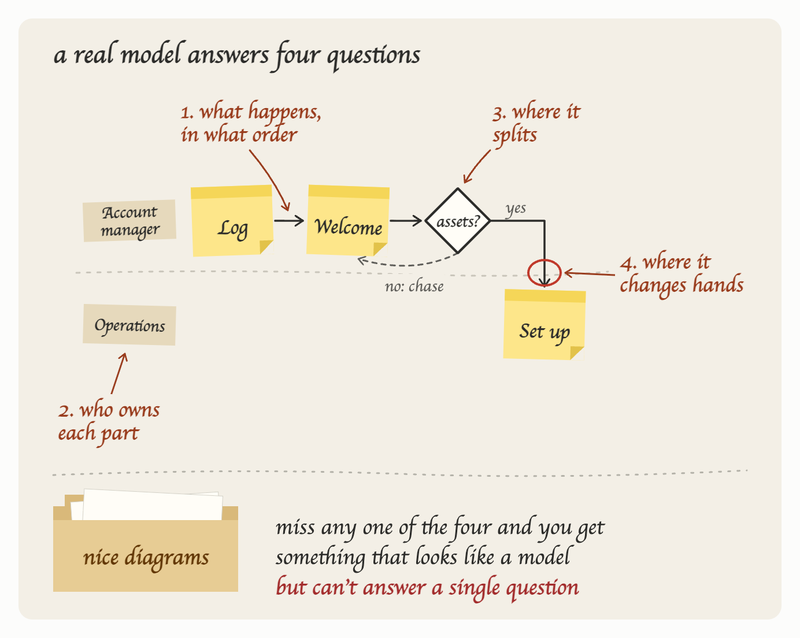
A complete business process model tells you four things about a piece of work: what happens and in what order, who owns each part, where the work splits depending on conditions, and where it changes hands. If you miss any one of those parts, you'll end up having something that looks like a model but cannot answer questions. Plenty of companies have a folder full of exactly that.
As-is and to-be, and why you need both
Modeling almost always produces two versions of the same process.
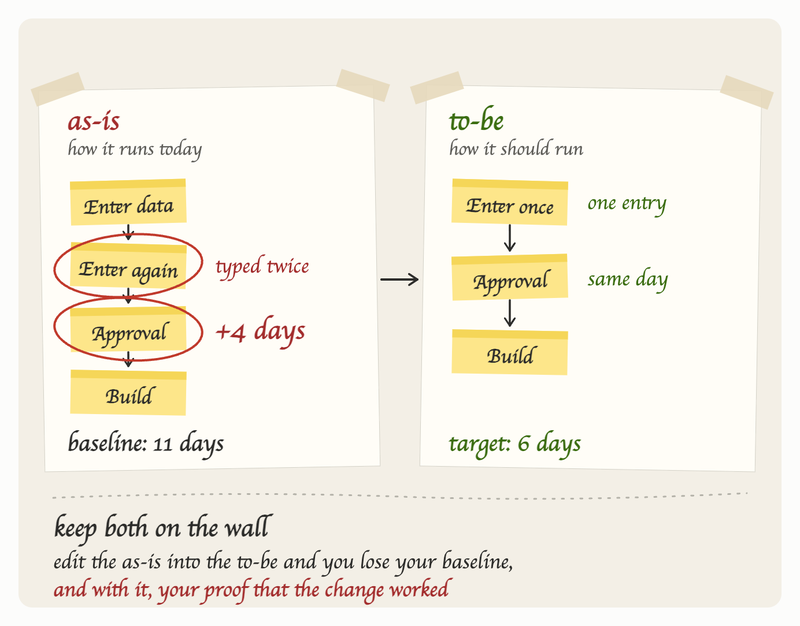
The as-is model describes how the work happens today. This is the diagnostic, and it is where you find the inefficiencies, blockers or bottlenecks (for example, duplicated data entry, or an approval that adds four days to the process).
The to-be model describes how the process should run once you have made changes. This is the design, and is also a communications and training tool, because showing people the before and after side by side enables far more for adoption than announcing a new way of working.
Keeping them as two separate things is important. Teams that edit the as-is model into the to-be model lose their baseline, and with it any ability to demonstrate that the change worked.
The case for business process modeling
The business case for BPM is that you cannot delegate, improve, or scale work you cannot see. And work you cannot see can means hidden time, cost and quality inefficiencies.
With business process modeling, you can more easily spot areas of improvement for your business: you will be able to find where time genuinely goes, which is usually not where the team assumes. You can reduce the dependency on the one person who holds the process in their head, a risk we covered in more depth in our piece on key person dependency. You can get new people productive faster, because the model gives them the correct shape of the work And you get a defensible answer when a client, an auditor, or a prospective buyer asks how you deliver, which is a question that can come unannounced in a growing company.
Is your business ready for BPM?
Modeling starts paying back when a process involves more than one person, runs often enough that inconsistency costs you, and is currently held together by memory and messages. Below that threshold, a checklist is the right tool and modeling is overkill.
The reliable signals that you have crossed the threshold are familiar to most owners and operations leads: the same questions keep reaching you, output quality varies depending on who did the work, new starters take longer to become useful than anyone expected, things that were agreed quietly stop happening a few months later, and more...
Business process modeling techniques
There's several different techniques that can be used when doing business process modeling. The table below summarizes the most common ones:
| Technique | What it is | Worth using when |
|---|---|---|
| Flowchart | Boxes, arrows and diamonds in sequence, no formal rules | You are modeling something that lives inside one team and you want the fastest readable version |
| Swimlane diagram | The same flow, split into lanes by who owns each step | The process crosses teams, which is when handoffs and accountability become the actual problem |
| BPMN | Business process model and notation, a formal standard with defined symbols and rules | You are scoping automation, working in a regulated environment, or handing the model to developers |
| UML activity diagram | A software engineering notation adapted to processes | Your process is largely a system behaviour and your audience is technical |
| Value stream map | A lean format that exposes waiting and non-value-added time between steps | Your goal is specifically reducing lead time rather than clarifying ownership |
| Gantt and PERT charts | Project scheduling formats | Honestly, rarely. These model projects with a start and end, not repeating processes |
The recommendation for most businesses is to model in swimlanes, using ordinary flowchart shapes. That combination gives you sequence and ownership in one view, needs no training to read, and covers the large majority of operational processes. BPMN is worth learning later if automation or compliance work is on your roadmap, and it stays useful as a shared vocabulary with technical teams, but it is not a prerequisite for anything in this guide.
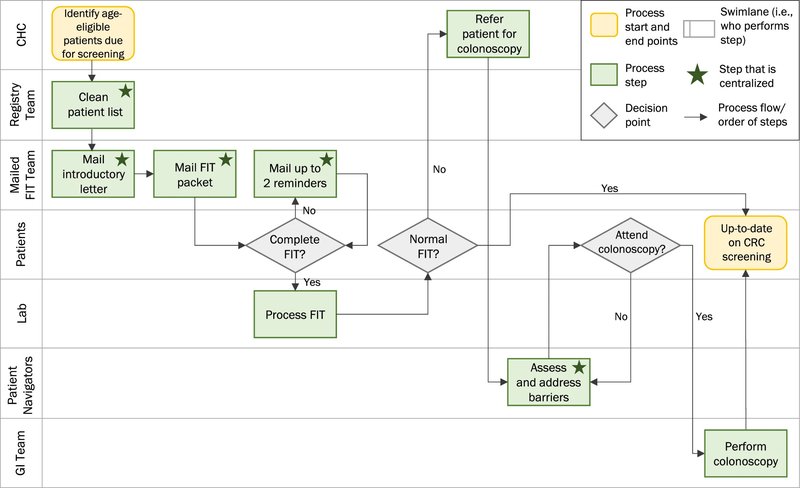
Above: example of a swimlane diagram
Five things your model needs
Whatever technique you end up choosing, a model is complete enough to act on when it carries five pieces of information.
| Element | The question it answers | What it looks like |
|---|---|---|
| Trigger | What starts this? | The event, not the first task. “Contract signed,” not “open the folder” |
| Steps | What happens, in order? | Verb plus object: “Send kickoff invite,” “Approve budget” |
| Owner | Who does each step? | A role, never a person’s name, so it survives turnover |
| Branches | Where does it split, and on what condition? | “Budget over £10k? Yes goes to finance, no goes straight to delivery” |
| Handoffs | Where does work change hands, and how long does it sit? | The arrow between two owners, with the typical wait written on it |
What follows is a session you can run on one real process, with the people you already have, in about two hours. Our process mapping guide covers the wider thinking about which processes to tackle and at what level of zoom. This one is about getting a single model built and used.
Three decisions to get started with business process modeling
Pick the process
Choose a process that runs at least weekly, involves more than one person, and currently annoys someone. Client onboarding, quote to invoice, new hire setup, and escalation handling are the usual first candidates because they cross teams and break visibly.
Set the boundary
Write down the exact trigger that starts the process and the exact outcome that ends it. “Client onboarding” is not a boundary. “Starts when the signed contract lands, ends when the client has received their first deliverable” is. Vague boundaries are the single most common reason these sessions run long and finish nothing, because the conversation keeps expanding into adjacent work.
Invite the people who do it, not the people who manage it
You want whoever actually performs the steps, plus one person from each team the work passes through. Four to six people is ideal. Above eight, the session turns into a meeting.
Block two hours and do it in one sitting. Splitting a modeling session across two weeks means re-establishing context twice and losing the momentum that makes people honest about the workarounds.
Step one: get the sequence on the wall (40 minutes)
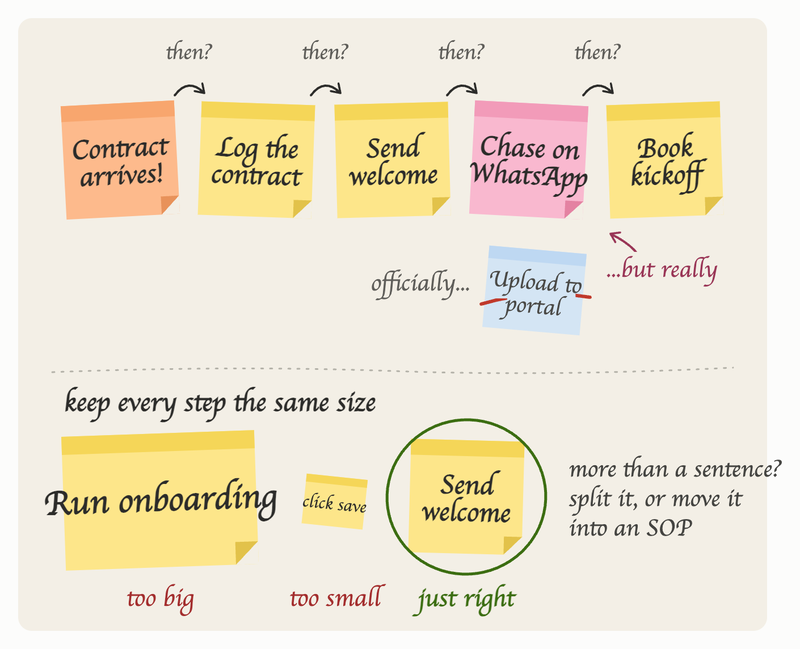
Start at the trigger and ask one question repeatedly: “and then what happens?” Write each step on its own sticky note or its own box, in order, without stopping to argue about whether it should work that way.
Two rules keep this productive: capture what actually happens rather than what is supposed to happen, which means letting people describe the workarounds without anyone getting defensive about them. And keep every step at roughly the same size, since a model that jumps from “run the quarterly review” to “click save” becomes unreadable. If a step needs more than a sentence to explain, it is really several steps or it belongs in an SOP underneath.
You will know the room is being honest when someone says a version of “well, officially we do X, but really we just...” That sentence is the reason you ran the session.
Step two: add the owners (15 minutes)
Redraw the sequence in horizontal lanes, one lane per role, with each step sitting in the lane of whoever performs it. This is a swimlane view, and it changes the conversation immediately, because the work stops being a line and starts being a set of exchanges between people.
Use role names rather than individual names. “Account manager” stays true when a team member moves on and stays true when two people share the job. It also exposes something worth knowing, which is that one person is often occupying four lanes at once, and that is usually the constraint everyone has been feeling without being able to point at.
Anyone outside your company gets their own lane too. Clients, suppliers and contractors are part of the process, and putting them on the board makes visible every point where your process is simply stopped, waiting on someone you cannot chase.
Here is an example of what that produces for a process most service businesses will recognize. The boundary is set as "starts when the signed contract arrives, ends when the client receives their first deliverable". Waiting times are written on the handoffs:
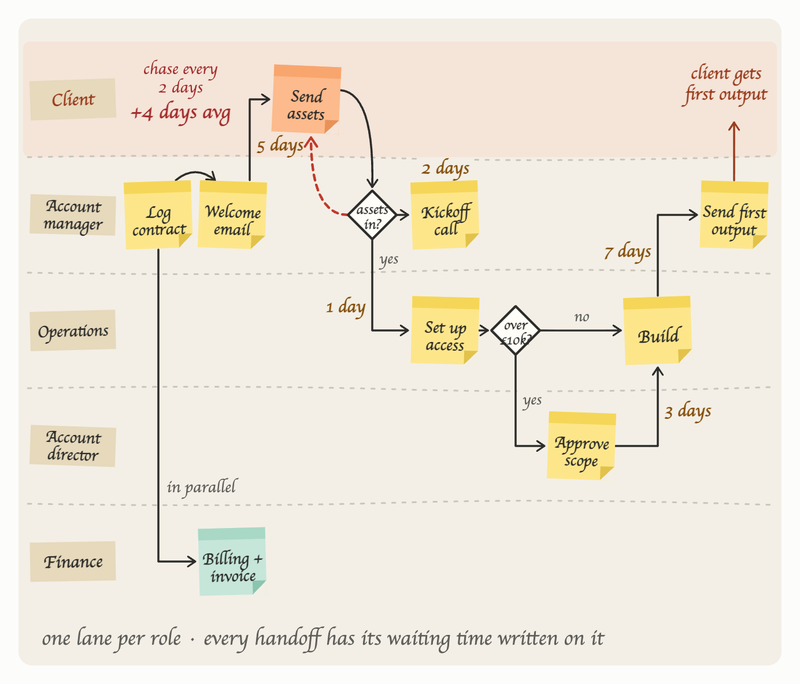
Put the elapsed times on the handoffs and the arithmetic does the rest: the inefficiencies surface on their own:
| What the team believed | What the model showed |
|---|---|
| “Onboarding takes about a week” | 11 days elapsed, of which 6 hours were actual work |
| “Finance approves the account setup” | Finance approved it, then ops re-entered the same details in a second system |
| “The kickoff call is the first step” | Three preparatory steps happened first, all owned by whoever noticed the contract |
| “We ask the client for assets once” | Assets were requested by two different people on two different days |
| Delays blamed on slow clients | Client turnaround averaged 2 days; internal handoffs averaged 4 |
Step three: interrogate the branches (25 minutes)
This is the highest-value part of the session and the part most teams skip. Go to every decision point in the model and ask what happens when the answer is no.
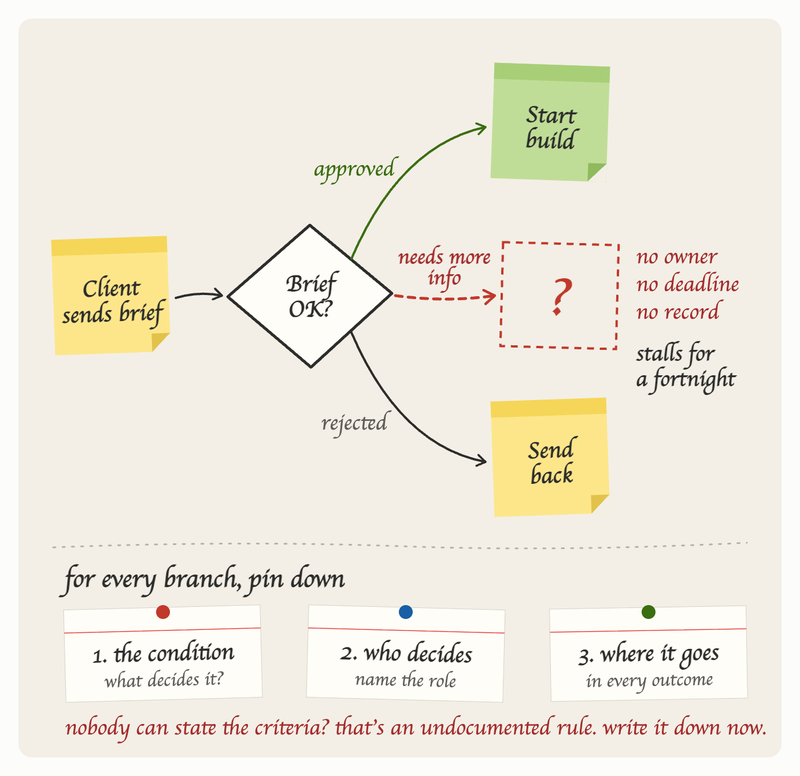
The pattern you will find is that processes are documented for the case where everything goes right, while the actual cost sits in the cases where something is missing, late, wrong, or unusual. A branch labelled “approved” and “rejected” looks complete until someone points out that most submissions come back marked “needs more information,” and that this third path has no defined owner, no deadline, and no record. Those undefined paths are where work stalls for a fortnight and where clients form their opinion of whether you are organized.
For each branch, pin down three things: the condition that decides it, who decides, and where the work goes in every possible outcome. If nobody in the room can state the criteria for a decision, you have found an undocumented rule. That is worth capturing on the spot, because it is simultaneously a training gap, a source of inconsistent output, and the reason the same question keeps reaching you.
Step four: mark the waiting (15 minutes)
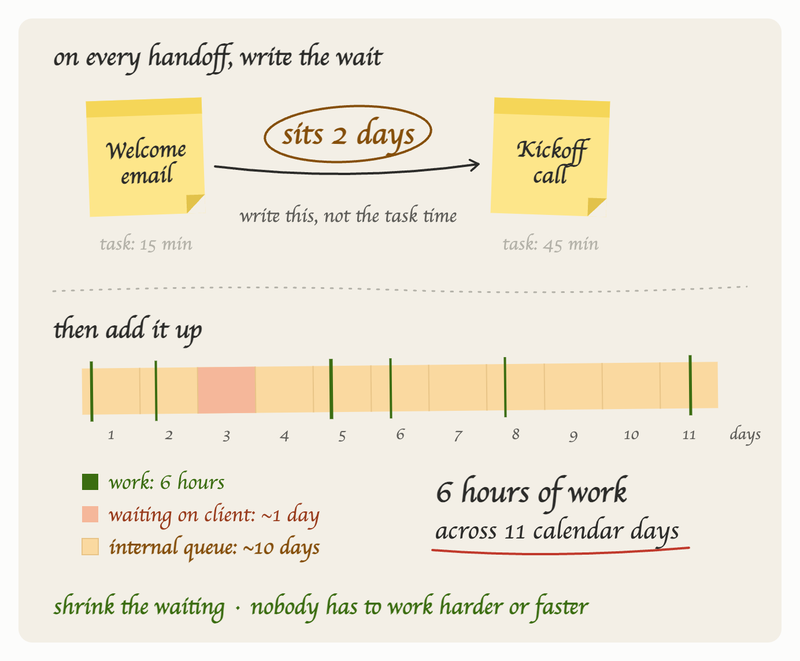
On every arrow where work passes between lanes, write the typical elapsed time. Not how long the task takes, but how long the work sits before the next person picks it up.
Add it up and compare the total against how long the process takes end to end. In the example above, six hours of work stretched across eleven calendar days, and the gap was almost entirely internal queue rather than client delay. That pattern holds in most service businesses, and it is usually the fastest improvement available to you, because reducing waiting rarely requires anyone to work harder or faster.
Step five: test it before you trust it (20 minutes)
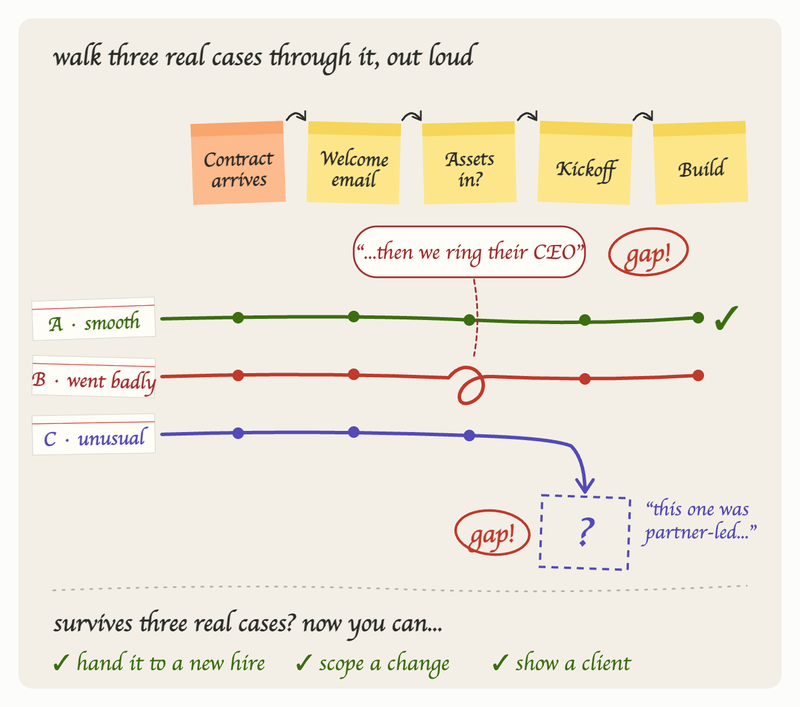
Pull three real cases from the last quarter: one that went smoothly, one that went badly, and one that was unusual. Walk each one through the model out loud.
Every point where someone has to explain something that is not on the board is a gap in the model. This test catches more errors than any amount of reviewing, and it takes twenty minutes. A model that survives three real cases is one you can hand to a new hire, use to scope a change, or show a client with confidence.
Turning the model into something that runs
A model that stays a photograph of a whiteboard delivers a fraction of its value. Three things convert it into working infrastructure:
Fix the cheap things immediately
Modeling sessions reliably produce two or three changes that cost nothing and can be decided in the room, usually a duplicated step removed or an approval that nobody actually needs. Do those within a week, because visible results are what earn you permission to model the next process.
Build the to-be version as a separate model
Keep the as-is model intact and draw the improved version alongside it. Holding both lets you show people exactly what is changing and why, which does considerably more for adoption than announcing a new process. It also gives you something to measure against.
Attach the detail underneath
The model shows the shape of the work. The instructions for each step live in the procedures beneath it. Keeping those linked is what stops the model going stale, since the natural place to record a change becomes the same place people look to find it.
That last point is what WorkFlawless is built around. You can rebuild the session output on the process flow canvas and switch between the flowchart view and the swimlane view depending on whether you are showing sequence or ownership, with each step linked to the SOP that explains how to perform it. Version control records what changed and when, reading assignments give you evidence the update reached the people it affects, and FloAI will draft a first version from a plain description or pull structured steps out of documents and recorded video, which removes most of the typing between the whiteboard and something usable.
A realistic first month
Here's what the first month looks like if you decide to get started with business process modeling:
| Week | What to do | Time |
|---|---|---|
| 1 | Model one process as-is, run the three-case test | 2.5 hours |
| 2 | Implement the quick fixes, write SOPs for the two steps that cause most errors | 3 hours |
| 3 | Draw the to-be model, walk the team through it | 2 hours |
| 4 | Model a second process, this time with one team member leading | 2 hours |
Handing the second session to someone else matters more than it looks. Process modeling becomes an operational capability when more than one person can run it, and the technique is simple enough to teach by doing it once together.
Frequently asked questions
What is the difference between business process modeling and process mapping?
In everyday use they overlap heavily, and both mean putting a process into visual form. Modeling usually implies a bit more structure: defined owners, defined branch conditions, and enough precision that the model supports a decision rather than just an overview.
What are the main business process modeling techniques?
Flowcharts, swimlane diagrams, BPMN, UML activity diagrams and value stream maps cover the field. For most companies, swimlane diagrams drawn with ordinary flowchart shapes handle the majority of processes, with BPMN reserved for automation and compliance work.
Do I need business process modeling software to start?
No. A wall and sticky notes is the fastest way to run the first session, and it keeps people talking rather than watching a screen. Software earns its place afterwards, when the model needs an owner, a version history, and links to the procedures underneath it.
How detailed should a business process model be?
Detailed enough that a competent new starter could follow it without asking a question, and no more. If the next level of detail would not change any decision you are making, stop and put it in an SOP instead.
How often should models be updated?
Tie reviews to change rather than to the calendar. A new tool, a new client type, a new team structure, or a process failure are all triggers to revisit whatever the change touches.
Who should own a process model?
Whoever is accountable for the outcome the process produces, which is often not the person who drew it. Ownership means being responsible for the model being true, not for having made it.
